
Rover written with RUST
IPC method
2025.11.10 23:35
For communication between applications on the same device (Inter-Process Communication or IPC), Shared Memory is the theoretical fastest method, but Unix Domain Sockets are often the most practical recommendation for your specific case.
Here is the breakdown of speed and overhead:
1. The Fastest: Shared Memory (RAM)
-
Speed: ???? Fastest
-
How it works: You designate a block of RAM that both your Rust app and Pascal app can read/write to directly.
-
Why it's fast: It is "Zero-Copy." The data doesn't move; one program writes it, and the other instantly sees it without the operating system having to copy bytes around.
-
Your Situation: You are already using this! Writing to
/dev/shm/creates files in RAM.-
The bottleneck: The slowness you might feel isn't the "method" (writing to file), it is the Text Conversion.
-
Fix: Converting
floatnumbers to text (e.g.,"-123.456") is computationally expensive. If you write the raw binary bytes of the integers/floats to/dev/shm/dots.bin, it will be 10x-50x faster than writing text files.
-
2. The Best Candidate: Unix Domain Sockets (UDS)
-
Speed: ???? Very Fast (Faster than UDP/TCP)
-
How it works: It looks like a network socket but stays entirely inside the Linux kernel. It creates a special file (e.g.,
/tmp/vo_socket). -
Why it's better than UDP:
-
Zero Network Overhead: It bypasses the entire network stack (no IP headers, no checksums, no routing lookups).
-
Reliable: Unlike UDP, it guarantees data arrives in order and isn't dropped, but it's still extremely lightweight.
-
-
Recommendation: This is the standard way to connect local apps (e.g., how Docker communicates with its daemon).
3. The Candidate: UDP (Loopback)
-
Speed: ???? Fast, but has overhead
-
How it works: Sends network packets to
127.0.0.1. -
Verdict: It is slower than Unix Sockets because the OS still has to pretend it's sending a network packet. It calculates checksums and headers even though it's just going to itself.
-
When to use: Only use UDP if you plan to move your viewer to a different computer later (e.g., viewing the robot's data from your laptop over WiFi).
Summary Recommendation
-
If you stay on the same device: Keep using
/dev/shm/(Shared Memory), but switch to Binary.-
Instead of writing text:
"-500 120 2500"(13 bytes + conversion cost) -
Write raw bytes:
[0xC4, 0x7A, 0x00, 0x00...](12 bytes, zero conversion cost). -
Pascal can easily read raw binary structures.
-
-
If you want a "stream" (like video): Use Unix Domain Sockets. It handles the flow control for you so you don't have to worry about reading a file at the exact same moment it's being written.
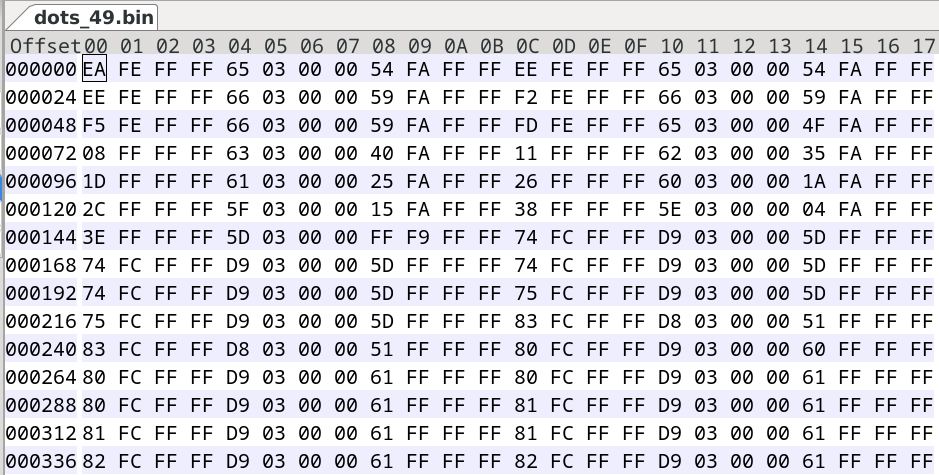
I am writing them as 32-bit Signed Integers (4 bytes each) in Little Endian format.
Here is the explanation of the data in your dots_49.bin file based on your screenshot (Hex.png):
The Data Structure
Every 12 bytes represents one 3D point:
-
X (4 bytes)
-
Y (4 bytes)
-
Z (4 bytes)
Decoding Your First Point (Offset 00-0B)
1. X Coordinate (Bytes 00-03): EA FE FF FF
-
Since this is Little Endian, you read the bytes backwards:
FF FF FE EA -
In hexadecimal,
0xFFFF FEEArepresents a negative number. -
Decimal Value: -278
2. Y Coordinate (Bytes 04-07): 65 03 00 00
-
Read backwards:
00 00 03 65 -
Decimal Value: 869 ()
3. Z Coordinate (Bytes 08-0B): 54 FA FF FF
-
Read backwards:
FF FF FA 54 -
Decimal Value: -1452
So, your first point is at (x: -278, y: 869, z: -1452) millimeters.
This makes sense because we applied your offsets:
-
X: Original was likely around
722. We appliedOFFSET_X = -1000. Result: -278. -
Y: Original was likely around
-131. We appliedOFFSET_Y = 1000. Result: 869.
How to read this in Pascal
type
TPoint3D = record
x: Integer; // 4 bytes (Int32)
y: Integer; // 4 bytes (Int32)
z: Integer; // 4 bytes (Int32)
end;
Here is the complete Object Pascal (Free Pascal / Lazarus) code to read the binary files generated by your Rust program.
This code does the following:
-
Defines a
packed recordthat exactly matches the 12-byte raw format. -
Loops through
/dev/shm/dots_00.bintodots_49.bin. -
Reads the raw binary data directly into a dynamic array (extremely fast).
-
Prints the first few coordinates to the console so you can verify they match your Rust output.
How to use
-
Open Lazarus.
-
File -> New -> Simple Program (or Console Application).
-
Paste this code.
-
Run it (F9).
ReadVoDots.lpr
program ReadVoDots;
{$mode objfpc}{$H+}
uses
Classes, SysUtils;
type
// This record exactly matches the 12 bytes per point written by Rust.
// "packed" ensures the compiler doesn't add gaps/padding between fields.
TPoint3D = packed record
X: Int32; // 4 bytes
Y: Int32; // 4 bytes
Z: Int32; // 4 bytes
end;
// A dynamic array to hold the loaded cloud
type
TPointCloud = array of TPoint3D;
// --- Function to Read a Single Binary File ---
procedure LoadPointCloud(const Filename: string; out Cloud: TPointCloud);
var
Stream: TFileStream;
FileSize: Int64;
NumPoints: Integer;
i: Integer;
begin
if not FileExists(Filename) then
begin
// Silent exit or log error if file isn't ready yet
// WriteLn('File not found: ', Filename);
Exit;
end;
Stream := TFileStream.Create(Filename, fmOpenRead or fmShareDenyNone);
try
FileSize := Stream.Size;
// Calculate how many points are in the file
NumPoints := FileSize div SizeOf(TPoint3D);
// Allocate memory for all points at once
SetLength(Cloud, NumPoints);
if NumPoints > 0 then
begin
// BLAST SPEED: Read the entire file directly into the array memory.
// No loop, no parsing, just raw memory copy.
Stream.ReadBuffer(Cloud[0], FileSize);
WriteLn(Format('Loaded %s: %d points', [ExtractFileName(Filename), NumPoints]));
// --- VERIFICATION ---
// Print the first 3 points to check if values look sane (integers like -500, 120, etc)
for i := 0 to 2 do
begin
if i < NumPoints then
WriteLn(Format(' [%d] X: %d Y: %d Z: %d', [i, Cloud[i].X, Cloud[i].Y, Cloud[i].Z]));
end;
end;
finally
Stream.Free;
end;
end;
var
i: Integer;
CurrentFile: string;
MyCloud: TPointCloud;
begin
WriteLn('--- Starting Point Cloud Reader ---');
// Loop through the sequence generated by Rust (00 to 49)
for i := 0 to 49 do
begin
// Format the filename exactly as Rust saves it: dots_00.bin, dots_01.bin...
CurrentFile := Format('/dev/shm/dots_%0.2d.bin', [i]);
LoadPointCloud(CurrentFile, MyCloud);
// Here "MyCloud" contains your data.
// You can now pass "MyCloud" to your OpenGL renderer or processing logic.
end;
WriteLn('--- Done ---');
// ReadLn; // Uncomment if you run from terminal and want it to pause
end.
Why this works
-
Int32: Matches Rust'si32perfectly. -
packed record: Ensures the memory layout is identical (X then Y then Z, no spaces). -
Stream.ReadBuffer(Cloud[0], ...): This is the fastest possible way to read data in Pascal. It dumps the file content directly into RAM in one operation.

MAX_WORLD_POINTS = 6_000;The buffer is now 6,000 points.Binary File Output: The code will save the first 50 frames it processes as binary files named
/dev/shm/dots_00.bin,/dev/shm/dots_01.bin, etc.File Format: Each file will contain only the X, Y, Z data as raw, 32-bit (4-byte) integers (e.g.,
[x_bytes][y_bytes][z_bytes][x_bytes]...). The R,G,B data is skipped. This will be extremely fast to write and easy for your Pascal program to read.